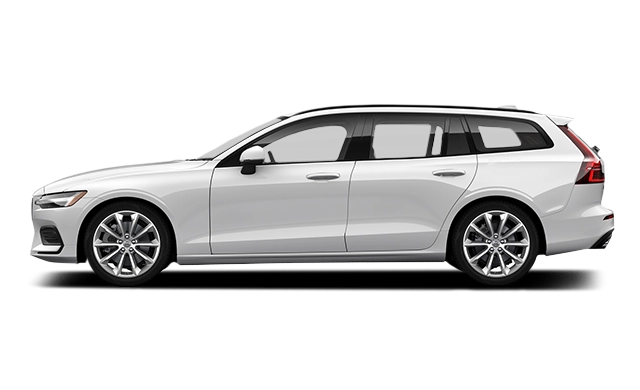
2015 Volvo V60 Owner's Manual

2015 Volvo V60 owners manual
Year:
2015
Make:
Volvo
Model:
V60
Rating:
(5)

Online manual

Size:
13.4 MB

Table of Contents

​
15
​
15
Owner's Manual in mobile devices
15
Options/accessories
15
Special texts
16
Footnote
16
Message texts
16
Decals
16
Warning for personal injury
16
Risk of property damage
16
Information
17
Procedure lists
17
Position lists
17
Bulleted lists
17
Related information
17
Images
17
To be continued
17
Continued from previous page
17
Enter with the numerical keyboard
19
Categories
19
Favourites
19
Quick Guide
19
​
21
22
Advantages of Volvo ID
22
Create a Volvo ID
22
​
23
Fuel consumption
23
Efficient emission control
23
Clean air in the passenger compartment
23
Interior
24
Volvo workshops and the environment
24
Reducing environmental impact
24
Recycling
24
​
25
​
27
Remember
27
​
28
Remember
28
​
29
​
29
​
30
Rear seat
30
​
31
​
32
​
33
​
33
Switch - PACOS
34
Switch - PACOS
34
​
36
​
37
​
37
​
38
Seat properties
39
​
39
Seating position
39
​
41
​
42
​
43
​
43
Child safety locks
44
​
45
Recommended child seatsWith regard to other child seats your car should be included in the manufacturer's enclosed list of vehicles or be universally approved in accordance with the ECE R44 legal requirement.
46
​
49
​
51
Stage 1Lower stage.
51
Stage 2Upper stage.
51
​
52
​
53
​
57
Overview, left-hand drive cars
60
Overview, right-hand drive cars
63
Information display
65
Functionality check
66
Information display
66
Functionality check
69
Instantaneous value
69
Available engine power
70
ABL fault
70
Emissions system
70
ABS fault
71
Rear fog lamp on
71
Stability system
71
Stability system, sport mode
71
Engine preheater (diesel)
71
Low level in fuel tank
71
Information, read display text
71
Main beam On
71
Left/right-hand direction indicator
71
Ecofunction on
71
Start/Stop
71
Tyre pressure system
71
Reminder – doors not closed
72
Low oil pressure
72
Parking brake applied
72
Airbags – SRS
72
Seatbelt reminder
72
Alternator not charging
73
Fault in brake system
73
Warning
73
Reminder – doors not closed
73
​
74
​
74
​
75
Set the clock
75
​
76
Warning symbols in the combined instrument panel
76
Control symbols in the combined instrument panel
76
Information symbols in the combined instrument panel
77
Information symbols in the roof console display
78
​
79
​
80
Insert the remote control key
80
​
80
Selecting key position/level
81
Audio system
81
Starting and stopping the engine
81
Towing
81
​
82
Lowering the passenger seat backrestOnly applies to comfort seats.
82
Power seat
83
Preparations
83
Seat with memory function
83
Store setting
83
Using a stored setting
83
Key memoryin remote control key
83
Emergency stop
84
Heated seats
84
Head restraint, centre seat, rear
84
Manual lowering of the outer head restraints, rear seat
84
Lowering the rear seat backrest
84
Electrical lowering of the rear seat's outer head restraints
85
Adjusting
86
Keypads and paddles
86
Horn
87
Function
87
Knob positions
88
Instrument lighting
89
Headlamp levelling
89
​
89
​
91
​
91
Dipped beam
91
Main beam flash
91
Main beam
91
Auxiliary lamps
91
Activating/deactivating
93
Manual operation
93
Cornering lights
95
​
95
​
96
​
96
​
97
Short flash sequence
97
Continuous flash sequence
97
Direction indicator symbols
97
​
97
Front roof lighting
98
Rear roof lighting
98
Courtesy lighting
98
Glovebox lighting
98
Vanity mirror lighting
98
Lighting in the cargo area
98
Automatic lighting
98
Neutral position
98
​
99
​
99
Active Xenon headlamps
99
Windscreen wipersFor replacing the wiper blades and service position wiper blades, see . For filling washer fluid, see .
100
Windscreen wipers off
100
Single sweep
100
Intermittent wiping
100
Continuous wiping
100
Service position wiper blade
100
Rain sensor
100
Activating and setting the sensitivity
100
Deactivate
100
Washing the headlamps and windows
101
Washing the windscreen
101
Heated washer nozzles
101
High-pressure headlamp washing
101
Reduced washing
101
Wiping and washing the rear window
101
Wiper – reversing
102
Operating without auto
103
Operating with auto
103
Operating with the remote control key and central locking
103
​
104
Adjusting
104
Storing settings
104
Angling the door mirror when parkingOnly in combination with power seat with memory, see .
104
Automatic angling of the door mirror when parking
104
Automatic retraction when locking
104
Resetting to neutral
104
Automatic dimming
104
Retractable power door mirrors
105
Home safe and approach lighting
105
​
106
Manual dimming
106
Automatic dimming
106
Operation
106
Opening
108
Closing
108
Vertical opening
108
Closing using the remote control key or central locking button
109
Sunscreen
109
Pinch protection
109
​
109
​
110
Analogue combined instrument panel
110
Digital combined instrument panel
110
​
111
​
112
​
112
Operation
112
EXITfunctions
113
​
113
Group menus
114
​
115
Functions
115
Headings
117
Resetting - Trip meter and Average speed
117
​
119
Functions
119
Headings
121
Resetting - Trip meter
121
Resetting - Average speed/consumption
122
Average
123
Average speed
123
Instantaneous
123
Range - distance to empty tank
123
Digital speed displayOnly with combined instrument panel \Digital\.
123
Change unit
123
Function
124
Operation
124
​
126
To bear in mind
126
Cars with Start/Stop
126
Cars with ECO
126
​
127
​
127
​
127
​
128
​
128
​
129
​
129
​
129
​
130
Air vents in the dashboard
130
Air vents in the door pillars
130
Air distribution
131
​
132
​
133
Automatic start of driver's seat heating
133
​
133
​
134
Fan knob
134
​
134
​
135
​
136
​
137
Timer
137
​
138
​
140
Refuelling
140
Parking on a hill
140
Battery and fuel
140
​
141
Direct start via the information display
141
Direct start via the remote control key
141
Direct start via a mobile
141
​
142
​
142
AdjustingSetting the timer is only possible with the engine switched off.
142
Starting
142
Switching off
142
​
146
​
146
Auto mode or shutdown
146
​
147
​
151
​
151
​
151
​
152
​
152
​
152
​
153
To bear in mind when loading
153
​
155
​
155
​
155
​
156
​
156
Securing the net cassettes
156
Using the safety net
157
Removing the net cassettes
157
​
158
​
158
Folding up
158
Fitting/removal
158
​
159
Attaching the cargo cover
159
Removing the cargo cover
159
Lowering the cargo cover's rear sealing disc
159
​
161
​
161
Emergency stop
162
For cars without Keyless Drive
163
For cars with Keyless Drive
163
​
163
Selecting the function
163
​
163
​
164
​
164
Functions
165
Function buttons
165
​
166
​
167
Using the information button
167
​
168
Outside the remote control key's range
168
​
168
Key blade functions
168
Removing the key blade
169
Attaching the key blade
169
​
169
​
170
​
171
Opening
171
Battery replacement
172
Remote control key (one battery)
172
Remote control key with PCC(two batteries)
172
Battery type
172
Assembly
172
​
172
​
173
​
173
​
174
​
174
​
175
​
175
​
176
​
176
​
177
Automatic relocking
177
​
177
Central locking
178
Unlocking
178
Lamp in lock button
178
Locking
178
Lock buttonrear doors
179
Automatic locking
179
​
179
​
179
Manual opening
180
Unlocking with the remote control key
180
Unlocking the car from inside
181
Locking with the remote control key
181
​
181
Temporary deactivation
182
Activate/deactivate child safety locks
182
Activation
183
​
184
Arming the alarm
184
Deactivate the alarm
184
Deactivating a triggered alarm
184
​
185
​
186
Lock system, standard
186
Keyless lock system (Keyless drive)
186
Comfort
189
Sport
189
Advanced
189
​
189
Active Yaw Control
190
Spin Control
190
Traction control system
190
Engine drag control - EDC
190
Corner Traction Control - CTC
190
Trailer Stability Assist - TSATrailer Stability Assistis included in the installation of Volvo genuine towbar.
190
Selection of level - Sportmode
190
Table
192
​
194
​
194
End of restriction or motorway
195
Additional signs
195
Display of additional information
195
Setting in MY CAR
195
Road sign information On/Off
196
Speed warning
196
​
196
Overview
197
Switch on and activate
197
While driving
197
When stationary
197
Changing the stored speed
198
Temporary deactivation - standby mode
198
Temporary deactivation with the accelerator pedal
198
​
199
​
199
Overview
200
Activating and setting the speed
201
Changing the stored speed
201
Temporary deactivation - standby mode
201
Standby mode due to driver intervention
201
Automatic standby mode
202
​
202
​
202
​
202
​
203
Automatic gearbox
203
Function overview
204
Warning lamp - braking by driver required
204
Steep roads and/or heavy load
205
Adaptive cruise control with Speed limiter
205
Adaptive cruise control without Speed limiter
206
​
206
Changing the stored speed
207
​
207
Temporary deactivation/standby mode - with speed limiter
208
Temporary deactivation/standby mode - without speed limiter
208
Standby mode due to driver intervention
208
Automatic standby mode
208
Resume set speed
209
​
209
Keypad with Speed limiter
209
Keypad without Speed limiter
209
​
210
Extended speed range
210
Change of target
210
Automatic standby mode with change of target
211
Termination of automatic braking at a standstill
211
Automatic activation parking brake
211
Changing from ACC to CC
211
Changing back from CC to ACC
212
​
212
​
212
Field of vision
212
​
214
​
215
​
217
Operation
217
Set time interval
217
​
218
​
219
​
220
​
221
On and Off
221
​
222
Fault tracing and action
223
​
224
Radiation data for the laser sensor
224
​
226
Level 1
227
Level 2
227
​
228
1 - Collision warning
228
2 - Brake support
228
3 - Auto Brake
228
​
229
​
230
Light and acoustic signals
231
Acoustic signal
231
Set warning distance
231
Checking settings
232
Maintenance
232
​
232
​
233
Fault tracing and action
234
​
235
​
237
​
237
Limitation
238
On/Off
238
Function
238
​
239
Lane Departure Warning LDW or LKA
240
Principle for LDW
240
Off & On
241
Personal preferences
241
​
241
​
242
​
243
Lane Departure Warning LDW or LKA
244
Principle for LKA
244
​
244
Off & On
245
Active steering
245
Warning with vibration in steering wheel
245
Dynamic cornering
246
​
246
​
246
​
247
Hands on the steering wheel
247
​
247
​
248
​
249
​
249
​
250
​
251
​
252
​
252
​
253
Function and operation
253
Light conditions
253
Park assist lines
254
Boundary lines
254
Cars with reversing sensors
254
Activate switched-off camera
255
Zoom
255
Automatic zoom
256
​
256
To bear in mind
256
​
256
​
257
​
257
​
258
1 - Searching and checking measurements
258
2 - Reversing in
258
3 - Straightening up
259
​
259
​
259
To bear in mind
260
Maintenance
261
​
261
​
261
Overview
262
Maintenance
262
Activate/deactivate BLIS
262
When BLIS operates
263
Limitations
263
Activate/deactivate CTA
264
When CTA operates
264
Limitations
264
Maintenance
265
​
266
​
266
​
267
​
269
Functions
269
Operation - battery
269
​
270
​
270
​
270
Result after breath test
271
​
272
Change of driver
272
​
272
Calibration and service
272
Cold or hot weather
272
Emergency situation
272
​
273
​
274
Keyless drive
274
​
275
Function
275
​
276
​
276
Remote starting the engine
276
With PCCFor more information on the PCC key, see .key
277
Active functions
277
Deactivated functions
277
ERS is interrupted
277
​
278
ERS function unavailable
278
Interrupted ERS function
278
Engine block heater
279
In the event of starting difficulties
279
Fuel adaptation
280
​
280
​
281
​
282
Reverse gear inhibitor
282
​
282
Manual gearbox
282
Automatic gearbox
283
​
283
Gear positions
283
Parking position - P
283
Reverse position - R
283
Neutral position - N
284
Drive position - D
284
S-)
284
Paddles
284
Geartronic - Sport mode (S)With certain engines only.
285
Geartronic- Winter mode
285
Kick-down
285
Towing
286
​
287
Towing
287
To bear in mind
287
Text message and action
287
Mechanical gear selector inhibitor
289
Automatic gear selector inhibitor
289
Electric gear inhibitor – Shiftlock Parking position (P)
289
Shiftlock – Neutral (N)
289
Deactivate automatic gear selector inhibitor
289
​
290
​
291
General information on Start/Stop
291
​
291
Auto-stopping the engine
291
Auto-starting the engine
292
Deactivating the Start/Stopfunction
292
Start assistance HSA
292
​
293
​
294
​
295
​
296
​
296
Text message
298
General
300
ECO- Operation
300
ECOfunction On or Off
300
Eco Coast- Function
300
Activating Eco Coast
301
Deactivate Eco Coast
301
Eco Coast- Limitations
301
More information and settings
301
​
302
Cleaning the brake discs
302
Maintenance
302
Symbols and messages
302
​
303
​
303
​
303
Function
304
Low battery voltage
304
Applying the parking brake
304
Emergency brake
304
Parking on a hill
304
Disengaging the parking brake
305
Cars with manual gearbox
305
Releasing manually
305
Releasing automatically
305
Cars with automatic gearbox
305
Releasing manually
305
Releasing automatically
305
Heavy load uphill
305
Replacing the brake linings
305
Symbols and messages
306
​
308
​
309
​
310
​
310
Slippery driving conditions
310
Opening/closing the fuel filler flap
311
​
311
Opening/closing the fuel cap
311
Filling up with fuel
311
Filling with a fuel canOnly applies to cars with diesel engine.
312
​
312
​
313
​
313
Empty tank
314
Draining condensation from the fuel filter
314
​
315
Lambda-sondTMoxygen sensor
315
​
315
Reserve fuel can
315
​
316
Regeneration in cold weather
316
​
317
​
318
Trailer cable
318
Direction indicators and brake lights on the trailer
318
Level control
318
Trailer weights
318
Overheating
319
Diesel engine 5-cyl
319
​
319
Steep inclines
319
Parking on a hill
319
Starting on a hill
319
​
320
Important checks
320
​
320
Specifications
320
​
321
Attaching
321
Removing the towbar
322
Function
324
Operation
324
Miscellaneous
324
​
325
Manual gearbox
325
Automatic gearbox Geartronic
325
Automatic gearbox Powershift
325
Jump starting
325
Attaching the towing eye
326
​
327
Driving characteristics
329
Tyre age
329
New tyres
329
Summer and winter tyres
329
Wear and maintenance
329
​
330
​
331
Check the air pressure in the tyres
331
Tyre pressure label
332
Fuel economy, ECO pressure
332
​
332
​
333
​
333
​
334
​
334
Locking wheel bolts
334
Winter tyres
335
Studded tyres
335
Tread depth
335
Using snow chains
335
Spare wheel
335
Taking out the spare wheel under the cargo area floor
336
Taking out the spare wheel in the bag
336
Removing
336
​
338
Installation
338
​
340
​
340
Tools - returning into place
340
​
341
​
342
​
343
System and tyre status
343
​
344
​
345
​
345
​
346
Recalibration
347
System and tyre status
347
​
348
Location of the emergency puncture repair kit
349
​
350
Emergency puncture repair
350
Check tyre pressure
352
​
353
​
354
​
356
Declaration of Conformity (Declaration of Conformity)
358
​
362
Volvo ID and my profile
362
Book a service or repair manually
363
My bookings
363
Call the dealer
363
Using the navigation system,
363
Sending vehicle data
363
Booking information and vehicle data
364
​
365
​
367
Engine compartment 4 cyl. 2.0 lDoes not apply to the B4204T7engine - see instead the following heading \Engine compartment except 4-cyl. 2.0 l\.
367
Engine compartment except 4 cyl. 2.0 lAlso applies to the B4204T7engine.
368
Regular checking
368
​
369
Measuring the oil level, 5-cyl. diesel
373
Checking the level and topping up
374
Checking the level
375
Troubleshooting and repair
376
​
376
Removing the headlamp
377
Securing the headlamp
378
​
378
​
379
​
379
​
380
​
380
Lamp housing, rear
380
​
381
​
381
​
382
Removal of lamp lens
382
Attaching the lamp lens
382
​
383
Service position
383
Replacing the wiper blades
384
Replacing the wiper blades, rear window
385
Cleaning
385
​
385
​
386
Symbols on the battery
388
​
388
Removal
388
Cross-stay on the R-Design
389
Location of the batteries
392
​
393
​
393
Changing
393
Location of central electrical units
393
​
395
General fuses, engine compartment
396
Positions (see preceding illustration)
396
​
399
Positions
399
​
401
Positions
401
​
403
Positions
403
​
404
Positions
404
Washing by hand
406
Wiper blades
406
Automatic car washes
406
High-pressure washing
406
Testing the brakes
407
Exterior plastic, rubber and trim components
407
Rims
407
​
407
Water and dirt-repellent coating
408
Inspection and maintenance
408
​
409
Fabric upholstery and ceiling upholstery
409
Leather upholstery
409
Leather steering wheel
409
Interior plastic, metal and wood parts
409
Seatbelts
409
Inlay mats and floor mat
409
Touching up minor paintwork damage
410
Colour code
410
Repairing minor paint damage such as stone chips and scratches
411
Label location
414
​
417
Max. weight braked trailer
418
Max. weight unbraked trailer
419
​
420
​
422
​
423
​
425
Manual gearbox
426
Automatic gearbox
426
​
428
​
428
​
428
​
429
​
430
​
435
Related information
437

2015 Volvo V60 Overview

Introduction

The 2015 Volvo V60 redefines the station wagon segment, combining Scandinavian elegance with a driver-focused experience. This sporty vehicle embodies modernity with its sleek lines and innovative features, making it an excellent choice for those who appreciate style and functionality. The V60’s robust design is complemented by Volvo’s hallmark commitment to safety, making it a reliable companion for families and adventurers alike.

Powertrains

Under the hood, the 2015 V60 offers a selection of powerful yet efficient engines. It comes equipped with a 2.0-liter turbocharged four-cylinder engine that balances performance with fuel economy. For those seeking more power, the available 2.5-liter turbocharged five-cylinder engine delivers an exhilarating driving experience. Both engines are paired with a six-speed automatic transmission, ensuring smooth shifts and an engaging ride. The V60 also features an all-wheel-drive option, enhancing traction and control in various driving conditions.

Trims

The 2015 V60 is available in several trims, allowing owners to select the configuration that aligns with their lifestyle. The base model, V60 T5, offers a well-rounded experience with premium features such as leather upholstery and a high-quality sound system. The V60 T6 adds extra horsepower and luxury, while the sporty V60 Polestar takes performance to another level with enhanced handling and power upgrades, catering to driving enthusiasts.

Features

What sets the V60 apart are its array of advanced features. The car is equipped with Volvo's Sensus infotainment system, providing seamless connectivity with smartphone integration. Safety features include the groundbreaking City Safety system that helps to prevent collisions. Additional amenities such as a panoramic sunroof, premium audio systems, and heated seats elevate the driving experience, making every journey comfortable and enjoyable.

Owner's Manual

The 2015 Volvo V60 comes with a comprehensive owner's manual, guiding drivers through the vehicle’s many features and functions. This manual provides valuable insights into maintenance procedures, safety features, and infotainment systems, ensuring that V60 owners can maximize their driving experience while maintaining the car's performance and longevity.

User manual download

The Volvo V60 owner manual for the 2015 model year is to be found in PDF downloadable format on this page. The owner manual for the model year 2015 is free and in English, but the repair manuals are usually not easy to get and may cost more.

Posted by, John Mana author bio image
A passionate guy about car models, makes, and manuals.

Manual Questions

Do you have questions about the 2015 Volvo V60 owners manual?
Fill the form below and someone will help you!