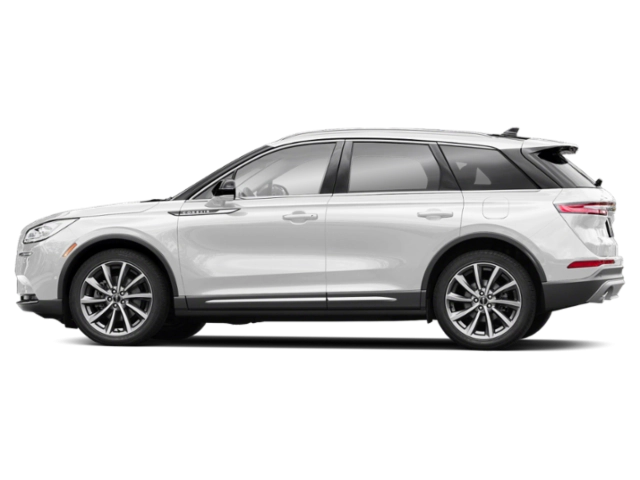
2027 Lincoln Corsair Owner's Manual
2027 Lincoln Corsair owners manual
Year:
2027
Make:
Lincoln
Model:
Corsair

Online manual

Size:
7.18 MB

Table of Contents

Table of contents
5
Copyright ©
3
Introduction
17
About This Publication
17
Using This Publication
19
Symbols Glossary
20
Symbols Used On Your Instrument Cluster
20
Data Privacy
22
Data Privacy
22
Service Data
23
Event Data
23
Settings Data
24
Connected Vehicle Data
24
Mobile Device Data
25
Emergency Call System Data
26
Environment
27
Protecting the Environment
27
Visual Search
28
Interior Overview
28
Exterior Overview
30
Child Safety
32
Child Safety Precautions
32
Child Restraint Anchor Points
33
Child Restraints
34
Installing Child Restraints
37
Booster Seats
42
Child Safety Locks
45
Seatbelts
48
Seatbelt Precautions
48
Fastening and Unfastening the Seatbelts
49
Sensitive Locking Mode
50
Automatic Locking Mode
50
Adjusting the Seatbelts During Pregnancy
51
Adjusting the Seatbelt Height
52
Seatbelt Reminder
52
Checking the Seatbelts
54
Seatbelt Extensions
55
Personal Safety System™
56
Personal Safety System™
56
Airbags
57
How Do the Front Airbags Work
57
How Do the Side Airbags Work
57
How Do the Knee Airbags Work
58
How Does the Safety Canopy™ Work
59
Airbag Precautions
60
Properly Adjusting the Driver and Front Passenger Seats
61
Children and Airbags
61
Front Passenger Sensing System
62
Crash Sensors and Airbag Indicator
65
Disposing of Airbags
66
Pedestrian Alert System
67
What Is the Pedestrian Alert System
67
911 Assist
68
911 Assist
68
Keys and Remote Controls
70
Remote Control Limitations
70
Using the Remote Control
70
Removing the Key Blade
71
Sounding the Panic Alarm
71
Locating Your Vehicle
71
Changing the Remote Control Battery
72
Replacing a Lost Key or Remote Control
73
Programming the Remote Control
73
Keys and Remote Controls Audible Warnings
74
Using the Valet Mode
74
Keys and Remote Controls – Troubleshooting
76
Phone as a Key
77
What Is Phone as a Key
77
Phone as a Key Limitations
77
Programming Your Phone
77
Using the Backup Start Passcode
78
Phone as a Key – Troubleshooting
78
Doors and Locks
80
Operating the Doors From Outside Your Vehicle
80
Operating the Doors From Inside Your Vehicle
81
Door Lock Switch Inhibitor
81
Autounlock
82
Autolock
82
Mislock
82
Doors and Locks Audible Warnings
83
Doors and Locks – Troubleshooting
83
Keyless Entry
85
What Is Keyless Entry
85
Keyless Entry Limitations
85
Keyless Entry Settings
85
Using Keyless Entry
85
Keyless Entry – Troubleshooting
86
Keyless Entry Keypad
87
What Is the Keyless Entry Keypad
87
Keyless Entry Keypad Limitations
87
Locating the Keyless Entry Keypad
87
Keyless Entry Keypad Master Access Code
87
Keyless Entry Keypad Personal Access Codes
88
Using the Keyless Entry Keypad
89
Keyless Entry Keypad – Troubleshooting
90
Easy Entry and Exit
91
How Does Easy Entry and Exit Work
91
Switching Easy Entry and Exit On and Off
91
Liftgate
92
Liftgate Precautions
92
Opening the Liftgate
92
Setting the Liftgate Opening Height
94
Closing the Liftgate
95
Stopping the Liftgate Movement
97
Liftgate Obstacle Detection
97
Liftgate – Troubleshooting
98
Security
100
Passive Anti-Theft System
100
Anti-Theft Alarm System
100
Security – Troubleshooting
101
Steering Wheel
102
Adjusting the Steering Wheel - Vehicles With: Manual Adjustable Steering Column
102
Adjusting the Steering Wheel - Vehicles With: Power Adjustable Steering Column
102
Resetting the Stopping Position - Vehicles With: Power Adjustable Steering Column
103
Horn
103
Switching the Heated Steering Wheel On and Off
103
Wipers and Washers
105
Wipers
105
Autowipers
105
Switching the Rear Window Wiper On and Off
106
Reverse Wipe
106
Checking the Wiper Blades
106
Replacing the Front Wiper Blades
107
Replacing the Rear Wiper Blades
107
Washers
108
Wipers and Washers – Troubleshooting
111
Exterior Lighting
112
Exterior Lighting Control
112
Headlamps
112
Autolamps
113
Exterior Lamps
113
Automatic High Beam Control
115
Automatic High Beam Control – Troubleshooting
118
Adaptive Front Lighting
119
Adaptive Front Lighting – Troubleshooting
120
Exterior Lighting – Frequently Asked Questions
121
Interior Lighting
122
Switching All of the Interior Lamps On and Off
122
Switching the Front Interior Lamps On and Off
122
Switching the Rear Interior Lamps On and Off
122
Interior Lamp Function
122
Adjusting the Instrument Panel Lighting Brightness
123
Ambient Lighting
123
Interior Lighting – Troubleshooting
123
Windows
124
Opening and Closing the Windows
124
Global Opening
125
Window Bounce-Back
125
Locking the Rear Window Controls
126
Interior Mirror
127
Interior Mirror Precautions
127
Auto-Dimming Interior Mirror
127
Exterior Mirrors
128
Adjusting the Exterior Mirrors
128
Folding the Exterior Mirrors
128
Glass Roof
130
Opening and Closing the Sunshade
130
Opening and Closing the Glass Roof
130
Venting the Glass Roof
131
Glass Roof Bounce-Back
131
Instrument Cluster
133
Instrument Cluster Overview
133
Speedometer
134
Fuel Gauge
134
Engine Coolant Temperature Gauge
135
Instrument Cluster Display
136
Using the Instrument Cluster Display Controls
136
Instrument Cluster Display Main Menu
137
Customizing the Instrument Cluster Display
137
EV Coach
138
Brake Coach
138
Trip Computer
139
Accessing the Trip Computer
139
Resetting the Trip Computer
139
Trip Data
139
Head Up Display
140
What Is the Head Up Display
140
Switching the Head Up Display On and Off
140
Head Up Display Settings
140
Head Up Display Indicators
142
Head Up Display – Troubleshooting
144
Remote Start
145
Using Remote Start - Vehicles With: Lincoln App
145
Using Remote Start - Vehicles With: Remote Control
145
Remote Start Settings
146
Climate Control
147
Identifying the Climate Control Unit
147
Switching Climate Control On and Off
147
Switching Recirculated Air On and Off
147
Switching Air Conditioning On and Off
147
Switching Defrost On and Off
147
Switching Maximum Defrost On and Off
148
Switching Maximum Cooling On and Off
148
Switching the Heated Rear Window On and Off
148
Setting the Blower Motor Speed
148
Switching the Heated Mirrors On and Off
149
Setting the Temperature
149
Directing the Flow of Air
149
Auto Mode
149
Climate Control Hints
151
Climate Control – Warning Lamps
152
Air Conditioning System Refrigerant
152
Interior Air Quality
154
What Is the Cabin Air Filter
154
Replacing the Cabin Air Filter
154
Auto Air Refresh
154
Interior Air Quality – Troubleshooting
157
Front Seats
158
Front Seat Precautions
158
Sitting in the Correct Position
158
Power Seats
159
Seat Features
162
Rear Seats
165
Manual Seats
165
Power Seats
168
Heated Seats
168
Rear Occupant Alert System
170
What is the Rear Occupant Alert System
170
How Does the Rear Occupant Alert System Work
170
Rear Occupant Alert System Precautions
170
Rear Occupant Alert System Limitations
170
Rear Occupant Alert System Settings
171
Rear Occupant Alert System Indicators
171
Rear Occupant Alert System Audible Warnings
171
Memory Function
173
How Does the Memory Function Work
173
Memory Function Precautions
173
Locating the Memory Function Buttons
173
Saving a Preset Position
173
Recalling a Preset Position
173
Garage Door Opener
175
Universal Garage Door Opener
175
Power Outlets and Device Charging
180
Power Outlets and Device Charging Overview
180
Power Outlet Precautions
182
DC Power Outlet
182
USB Ports
183
Wireless Accessory Charger
184
Storage
186
Overhead Storage
186
Glove Compartment
186
Center Console
186
Starting and Stopping the Engine
187
Starting and Stopping the Engine – Precautions
187
Push Button Ignition Switch
187
Starting the Engine
188
Engine Block Heater
189
Stopping the Engine
190
Automatic Engine Stop
191
Accessing the Passive Key Backup Position
192
Starting and Stopping the Engine – Troubleshooting
192
Hybrid Electric Vehicle Information
196
Hybrid Electric Vehicle Information
196
Fuel and Refueling
199
Fuel and Refueling Precautions
199
Fuel Quality
200
Locating the Fuel Filler Funnel
201
Running Out of Fuel
201
Refueling
202
Fuel Tank Capacity
205
Fuel and Refueling – Troubleshooting
206
Catalytic Converter
208
What Is the Catalytic Converter
208
Catalytic Converter Precautions
208
Catalytic Converter – Troubleshooting
209
High Voltage Battery
210
What Is the High Voltage Battery
210
High Voltage Battery Precautions
210
Recycling and Disposing of the High Voltage Battery
210
Automatic Transmission
211
Automatic Transmission Positions
211
Temporary Neutral Mode
213
Automatic Return to Park (P)
214
Grade Assist
215
Shifting Your Immobile Vehicle Out of Park (P)
215
Automatic Transmission Audible Warnings
216
Automatic Transmission Fluid Capacity and Specification
216
Automatic Transmission – Information Messages
217
All-Wheel Drive
218
How Does All-Wheel Drive Work
218
All-Wheel Drive Precautions and Limitations
218
All-Wheel Drive – Troubleshooting
219
Drive Mode Control
220
What Is Drive Mode Control
220
How Does Drive Mode Control Work
220
Selecting a Drive Mode
220
Drive Modes
220
Drive Mode Control – Troubleshooting
221
Brakes
223
Brake Precautions
223
Anti-Lock Braking System
223
Brake Over Accelerator
223
Locating the Brake Fluid Reservoir
223
Checking the Brake Fluid
223
Brake Fluid Specification
224
Brakes – Troubleshooting
225
Electric Parking Brake
227
What Is the Electric Parking Brake
227
Applying the Electric Parking Brake
227
Applying the Electric Parking Brake in an Emergency
227
Manually Releasing the Electric Parking Brake
228
Automatically Releasing the Electric Parking Brake
228
Electric Parking Brake Audible Warning
228
Releasing the Electric Parking Brake if the Vehicle Battery Has Run Out of Charge
228
Electric Parking Brake – Troubleshooting
228
Hill Start Assist
230
What Is Hill Start Assist
230
How Does Hill Start Assist Work
230
Hill Start Assist Precautions
230
Hill Start Assist – Troubleshooting
230
Auto Hold
231
How Does Auto Hold Work
231
Switching Auto Hold On and Off
231
Using Auto Hold
231
Auto Hold Indicators
232
Traction Control
233
What Is Traction Control
233
How Does Traction Control Work
233
Switching Traction Control On and Off
233
Traction Control Indicator
233
Traction Control – Troubleshooting
234
Stability Control
235
How Does Stability Control Work
235
Switching Stability Control On and Off
236
Stability Control Indicator
236
Stability Control – Troubleshooting
237
Steering
238
Electric Power Steering
238
Steering – Troubleshooting
239
Driver Assistance Systems
240
Driver Assistance Systems Overview
240
Pre-Collision Assist
247
360 Degree Camera
253
Parking Aids
256
Cross Traffic Alert
261
Reverse Brake Assist
264
Blind Spot Information System
266
Driver Alert
268
Lane Keeping System
270
Speed Sign Recognition
278
Adaptive Cruise Control
280
Lane Centering
291
Predictive Speed Assist
295
Lincoln BlueCruise
298
Load Carrying
311
Load Carrying Precautions
311
Locating the Safety Compliance Certification Labels
312
What Is the Gross Axle Weight Rating
312
What Is the Gross Vehicle Weight Rating
312
What Is the Gross Combined Weight Rating
313
Calculating Payload
313
Calculating the Load Limit
313
Roof Rack
315
Luggage Compartment
316
Luggage Compartment Precautions
316
Towing a Trailer
317
Towing a Trailer Precautions
317
Driving Hints
318
Breaking-In
318
Driving Economically
318
Driving in Cold Weather
318
Driving Through Mud and Water
319
Driving on Hilly or Sloping Terrain
319
Driving In Sand
320
Driving Through Shallow Water
320
Floor Mats
321
Crash and Breakdown Information
323
Roadside Assistance
323
High Voltage Battery Vehicle Precautions
324
Switching the Hazard Flashers On and Off
326
Jump Starting the Vehicle
326
Post-Crash Alert System
329
Post-Collision Braking
329
Automatic Crash Shutoff
329
Transporting the Vehicle
330
Fail-Safe Cooling
331
Towing Your Vehicle
333
Towing Your Vehicle Precautions
333
Emergency Towing
333
Towing Your Vehicle – Troubleshooting
334
Fuses
335
Fuse Precautions
335
Under Hood Fuse Box
335
Body Control Module Fuse Box
344
Identifying Fuse Types
348
Fuses – Troubleshooting
348
Maintenance
349
Maintenance Precautions
349
Opening and Closing the Hood
349
Under Hood Overview
351
Engine Oil
353
Engine Air Filter
357
Changing the Engine Air Filter
357
Coolant
358
Changing the Fuel Filter
363
Drive Belt Routing Overview
364
12V Battery
364
12V Battery – Troubleshooting
366
Adjusting the Headlamps
368
Exterior Bulbs
369
Interior Bulbs
369
Vehicle Specifications
370
Engine Specifications
370
Transmission Specifications
371
Motorcraft Parts
372
Vehicle Care
373
Cleaning Products
373
Cleaning the Exterior
374
Cleaning the Interior
376
Repairing Minor Paint Damage
379
Waxing Your Vehicle
379
Body Styling Kits
380
Body Styling Kit Precautions
380
Storing Your Vehicle
381
Preparing Your Vehicle for Storage
381
Removing Your Vehicle From Storage
382
Wheel and Tire Information
383
Locating the Tire label
383
Department of Transportation Uniform Tire Quality Grades
383
Information on the Tire Sidewall
384
Glossary of Tire Terminology
389
Tire Replacement Requirements
389
Using Snow Chains
392
Tire Care
395
Checking the Tire Pressures
395
Inflating the Tires
395
Inspecting the Tire for Wear
396
Inspecting the Tire for Damage
396
Inspecting the Wheel Valve Stems
400
Tire Rotation
400
Tire Sealant and Inflator Kit
402
What Is the Tire Sealant and Inflator Kit
402
Tire Sealant and Inflator Kit Precautions
402
Locating the Tire Sealant and Inflator Kit
402
Tire Sealant and Inflator Kit Components
403
Using the Tire Sealant and Inflator Kit
403
Tire Pressure Monitoring System
410
What Is the Tire Pressure Monitoring System
410
Tire Pressure Monitoring System Overview
410
Tire Pressure Monitoring System Precautions
411
Tire Pressure Monitoring System Limitations
412
Viewing the Tire Pressures
412
Tire Pressure Monitoring System – Troubleshooting
412
Changing a Road Wheel
415
Changing a Flat Tire
415
Wheel Nuts
421
Vehicle Identification
423
Vehicle Identification Number
423
Installing the Vehicle Identification Card
423
Connected Vehicle
425
What Is a Connected Vehicle
425
Connected Vehicle Requirements
425
Connected Vehicle Limitations
425
Connecting the Vehicle to a Mobile Network
425
Connecting the Vehicle to a Wi-Fi Network
426
Connected Vehicle Settings
426
Connected Vehicle – Troubleshooting
426
Vehicle Hotspot
429
Vehicle Hotspot
429
Audio System
431
Audio System Precautions
431
Switching the Audio Unit On and Off
431
Selecting the Audio Source
431
Media Control Buttons
431
Adjusting the Volume
432
Setting a Memory Preset
432
Adjusting the Sound Settings
432
Setting the Clock and Date
432
AM/FM Radio
433
Switching the Display On and Off
433
Digital Radio
433
Satellite Radio
435
Audio System – Troubleshooting
437
Center Display
441
Center Display Overview
441
Home Screen
441
Status Bar
441
Information On Demand Screen
443
Feature Bar
443
Settings
443
Driver Assistance Menu
443
Rebooting the Center Display
443
Voice Interaction
444
Lincoln Personal Assistant
444
Alexa Built-In
446
What is Alexa Built-In
446
Alexa Built-In Requirements
446
Signing In to Your Account
446
Using Alexa Built-In
446
Alexa Built-In Settings
446
Phone
448
Phone Precautions
448
Connecting Your Phone
448
Phone Menu
448
Making and Receiving a Phone Call
450
Sending and Receiving a Text Message
452
Switching Text Message Notification On and Off
453
Enabling Apps on a Mobile Device
453
Switching Apple CarPlay On and Off
454
Switching Android Auto™ On and Off
456
Bluetooth®
457
Connecting a Bluetooth® Device
457
Playing Media Using Bluetooth®
457
Personal Profiles
458
How Do Personal Profiles Work
458
Enabling or Disabling Personal Profiles
458
Creating a Personal Profile
459
Linking or Unlinking a Personal Profile to a Remote Control
459
Linking or Unlinking a Personal Profile to a Device
459
Navigation
461
Connected Navigation
461
Accessing Navigation
461
Navigation Map Updates
461
Adjusting the Map
461
Live Traffic
461
Setting a Destination
462
Waypoints
462
Route Guidance
463
Vehicle Software Updates
464
Vehicle Software Updates
464
Software Update Settings
464
Software Update Indicators
465
Vehicle System Reset
466
Performing a System Reset
466
Accessories
467
Accessories
467
Lincoln Protect
469
What Is Lincoln Protect
469
Scheduled Maintenance
472
Scheduled Maintenance
472
General Maintenance Information
476
Customer Information
482
Rollover Warning
482
Getting the Services You Need
482
In California (U.S. Only)
485
The Better Business Bureau Auto Line Program
488
The Mediation and Arbitration Program
489
Getting Assistance Outside the U.S. and Canada
489
Reporting Safety Defects in the United States
490
Reporting Safety Defects in Canada
490
Third Party Software Copyright Acknowledgment
492
Radio Frequency Certification Labels
492
Perchlorate
492
Replacement Parts Recommendation
492
Mobile Communications Equipment
493
Federal Highway Administration Regulation
493
End User License Agreement
494
Emission Law
525
Export Unique Options
526
Warranty Information
526
Appendices
529
Electromagnetic Compatibility
529
Index
535

2027 Lincoln Corsair Overview

Owner's Manual

The Owner's Manual for the 2027 Lincoln Corsair is an essential companion that explains vehicle operation, safety protocols, routine maintenance, and system troubleshooting. It guides owners through dashboard indicators, adaptive driver-assist settings, infotainment customization, and recommended service intervals. Clear diagrams and step-by-step procedures help users perform basic checks and understand warranty and service schedules. Treated as a living reference, the manual supports safe, efficient ownership, reduces unexpected repairs, and helps preserve vehicle value by encouraging proper care and informed use.

Introduction

The 2027 Lincoln Corsair blends refined luxury with modern technology in a compact SUV package designed for comfort and confident driving. Subtle exterior updates sharpen the profile while a meticulously crafted cabin emphasizes premium materials, ambient lighting, and ergonomic seating. The Corsair balances urban agility with composed highway manners, offering a quiet ride and intuitive controls. Advanced connectivity and tailored driver assistance create a sanctuary for daily commuting or weekend travel, positioning this model as a contemporary expression of Lincoln's quiet luxury ethos.

Powertrains

Powertrains deliver a refined mix of efficiency and responsiveness. The standard turbocharged four-cylinder provides brisk acceleration and smooth delivery for everyday driving, while an optional turbocharged hybrid pairs electric assist with gasoline power for improved fuel economy and instant torque. Both powertrains are tuned for quiet operation and seamless gear changes, supported by available all-wheel drive and multiple drive modes that optimize performance across city streets, highways, and inclement conditions.

Trims

The Corsair lineup offers curated trims for different needs. Reserve focuses on comfort and core tech; Grand Touring adds premium upholstery, upgraded audio, and advanced driver aids. Black Label elevates personalization with exclusive materials and concierge services. Each trim stacks convenience and safety, letting buyers prioritize luxury, technology, or value without losing Lincoln's signature refinement.

Features

Features emphasize comfort, connectivity, and safety. Standard amenities include a high-resolution infotainment display with wireless smartphone integration, multi-zone climate control, heated seating, and adaptive cruise control. Optional upgrades add a premium sound system, head-up display, sunroof, and parking assist. Active safety technologies like lane-keeping, automatic emergency braking, and blind-spot monitoring work cohesively to support confident driving in varied conditions across everyday scenarios.

User manual download

The Lincoln Corsair owner manual for the 2027 model year is to be found in PDF downloadable format on this page. The owner manual for the model year 2027 is free and in English, but the repair manuals are usually not easy to get and may cost more.

Posted by, John Mana author bio image
A passionate guy about car models, makes, and manuals.

Manual Questions

Do you have questions about the 2027 Lincoln Corsair owners manual?
Fill the form below and someone will help you!