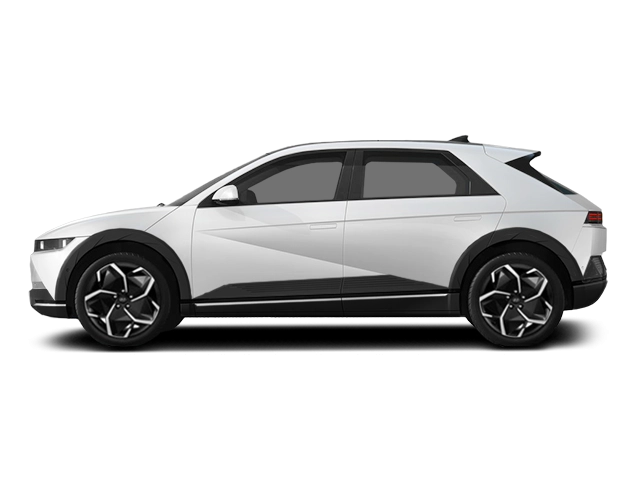
2027 Hyundai Ioniq 5 Owner's Manual
2027 Hyundai Ioniq 5 owners manual
Year:
2027
Make:
Hyundai
Model:
Ioniq 5

Online manual

Size:
9.42 MB

Table of Contents

- Introduction/Getting started with Your Electric Vehicle
7
Introduction
9
Vehicle Data Collection and Event Data Recorders
16
About \Getting Started with Your Electric Vehicle\
17
Understanding Your Electric Vehicle
18
Characteristics of Your Electric Vehicle
18
Precautions When Using the High Voltage Battery
19
Other Precautions for Electric Vehicle Management
21
Charging Your Electric Vehicle
22
Safety Precautions for Charging Your Electric Vehicle
22
Checking Basic Information on Charging Your Electric Vehicle
26
Using an AC Charger
30
Using a DC Charger
32
Using an adapter
34
Using a Portable Charger (ICCB)
39
Stopping Charging Immediately
49
Using Electric Vehicle Functions
51
Checking the Electric Vehicle Screen Configuration
51
Checking Energy Information
52
Setting the Next Departure Time
55
Setting the Options for the AC Charger
56
Setting a Battery Discharging Limit When Using Vehicle to Load (V2L)
59
Setting Electric Vehicle Specialized Functions
60
Using V2L Function
66
Safety Precautions When Using the V2L Function
66
Using Electricity Outside the Vehicle
68
Using Electricity Inside the Vehicle
69
Solving V2L Problems
71
Driving Your Electric Vehicle
73
Starting and Stopping the Vehicle
73
Checking Electric Vehicle Driving Information
74
Countermeasures for Accidents or Fire
85
If the Electric Vehicle Catches Fire
85
If the Electric Vehicle Is Submerged
85
If the Electric Vehicle Needs Towing
86
Exterior overview (Front View)
90
Exterior overview (Rear View)
91
Interior overview
92
Center Console Overview
94
Steering Wheel Control Overview
96
Important safety precautions
101
Always Wear Your Seat Belt
101
Restrain All Children
101
Airbag Hazards
101
Driver Distraction
101
Control Your Speed
102
Never Drink or Take Drugs and Drive
102
Keep Your Vehicle In Safe Condition
102
Seats
103
Safety Precautions
104
Front Seats
106
Rear Seats
114
Head Restraint
117
Seat Warmers
125
Air Ventilation Seats
128
Seat belts
129
Seat Belt Safety Precautions
129
Seat Belt Warning Light
130
Seat Belt Restraint System
132
Additional Seat Belt Safety Precautions
138
Care of Seat Belts
140
Child Restraint System (CRS)
141
Children Always in the Rear
141
Selecting a Child Restraint System (CRS)
142
Installing a Child Restraint System (CRS)
144
Airbag - supplemental restraint system
152
SRS Components
154
Where are the Airbags?
155
How does the Airbags System Operate?
159
What to Expect After an Airbag Inflates
163
SRS Warning Light
163
Occupant Classification System (OCS)
164
Why didn't My Airbag Go Off in a Collision?
171
SRS Care
176
Additional Safety Precautions
177
Instrument cluster
180
Instrument cluster control
181
Gauges and Meters
182
Gear Shift Indicator
187
Warning and Indicator Lights
188
Cluster Display Messages
204
Cluster Display
210
Cluster Display Control
210
View Modes
210
Vehicle settings (infotainment system)
216
Accessing your vehicle
222
Smart Key
222
Immobilizer System
231
Hyundai Digital Key
232
Digital Key (Smartphone)
232
Digital Key (Card Key Accessory)
240
Used Vehicle/Digital Key Maintenance
245
Limitations of the System
246
Door locks
247
Unlocking the door from Outside the Vehicle (Manual type)
247
Unlocking the door from Outside the Vehicle (Power Handles)
247
Operating Door Locks from Outside the Vehicle (Manual type)
249
Operating Door Locks from Outside the Vehicle (Electric type)
249
Operating Door Lock/Unlock from Inside the Vehicle
252
Automatic Door Lock and Unlock Features
255
Electronic Rear Door Child Safety Lock (Doors and Power window locks with one button)
256
Vehicle Auto-Shut Off Function
257
Theft-alarm system
259
Rear Occupant Alert (ROA)
261
System Setting
261
System Operation
261
Advanced Rear Occupant Alert (ROA)
262
Advanced Rear Occupant Alert Settings
262
Advanced Rear Occupant Alert Operation
262
Advanced Rear Occupant Alert precautions
264
Declaration of Conformity
265
Integrated memory system
268
Storing Memory Positions
268
Recalling Memory Positions
268
Resetting the System
269
Seat Easy Access
270
Steering wheel
271
Motor Driven Power Steering (MDPS)
271
Tilt/Telescopic Steering
272
Horn
273
Heated steering wheel
273
Steering wheel grip sensor
274
Haptic warning/Steering wheel vibration warning
275
Mirrors
276
Inside Rearview Mirror
276
Side View Mirrors
296
Reverse Parking Aid
299
Windows
301
Power Windows
301
Vision roof
306
Resetting the Vision Roof
308
Hood
310
Opening the Hood
310
Closing the Hood
310
Front trunk
312
Opening the front trunk
312
Closing the front trunk
312
Liftgate
314
Opening the liftgate
314
Closing the liftgate
314
Emergency liftgate safety release
315
Power Liftgate
317
Power Liftgate Operating Conditions
317
Operating the Power Liftgate
319
Setting the Power Liftgate
321
Resetting the Power Liftgate
322
Emergency Liftgate Safety Release
323
Smart Liftgate
324
Using Smart Liftgate
324
Deactivating Smart Liftgate
325
Detecting Area
326
Electric Charging Door
327
Head-Up Display
329
Head-Up Display Settings
329
Head-Up Display Information
330
Precautions while Using the Head-Up Display
330
Over-The-Air Software Update
332
Downloading Software
332
Approving Software Update
332
Preparing Software Update
332
Updating Software
333
Exterior Lights
336
Lighting Control
336
High Beam Operation
338
Turn Signals and Lane Change Signals
339
Battery Saver Function
339
Headlight Delay Function
340
Daytime Running Light (DRL)
340
High Beam Assist (HBA)
341
High Beam Assist Settings
342
High Beam Assist Operation
342
High Beam Assist Malfunction and Limitations
343
Interior Lights
345
Interior Light AUTO cut
345
Interior Button Lights
345
Front Lamps
345
Rear Lamps
346
Vanity Mirror Lamp
347
Glove Box Lamp
347
Ambient Light
348
Luggage Compartment Lamp
348
Wipers and Washers
349
Front Windshield Wipers
349
Front Windshield Washers
351
Rear Windshield Wipers
352
Rear Windshield Washers
353
Automatic Climate Control System
354
Automatic Heating and Air Conditioning
354
Manual Heating and Air Conditioning
356
System Operation
363
System Maintenance
364
Windshield Defrosting and Defogging
365
Automatic Climate Control System
365
Defogging Logic
366
Rear window defroster
366
Climate Control Additional Features
368
Air Conditioner Auto-Dry
368
Auto Defogging System
369
Auto Dehumidify
370
Recirculating Air When Washer Fluid is Used
370
Recirculating Air When Entering a Tunnel
371
Smart Ventilation
371
Storage compartment
373
Center Console Storage
373
Glove Box
374
Interior features
376
Cup Holder
376
Sunvisor
377
Power Outlet
378
USB Charge Ports
379
Cluster fascia side panel
381
Wireless Smartphone Charging System
381
Vehicle to Load (Indoor V2L)
384
Clock
384
Coat Hook
385
Floor Mat Anchor(s)
385
Rear Side Window Sunshades
386
Cargo Security Screen (available as an accessory)
387
Exterior Features
390
Roof Side Rails
390
Infotainment system
392
USB Port
392
Antenna
393
Steering Wheel Remote Controls
393
Infotainment System
395
Voice Recognition
395
Before driving
400
Before Entering the Vehicle
400
Before Starting
400
Start/Stop button
402
Start/Stop Button Positions
403
Starting the Vehicle
404
Turning Off the Vehicle
406
Remote Start
407
Gear Shifting
408
Gear Shifting Operation
408
Cluster Display Messages
414
Good Driving Practices
415
Regenerative Braking System
417
Using Regenerative Braking System
417
Regenerative Braking System Limitations
418
One Pedal Driving
418
Using i-PEDAL
420
Smart Regeneration System
422
Smart Regeneration System On/Off
422
Smart Regeneration System Operating Condition
423
Smart Regeneration Level Settings
423
Pausing Smart Regeneration System
424
Front Sensor (Front Radar)
424
System Check Message
425
Smart Regeneration System Precautions
425
Braking system
430
Power-Assist Brakes
430
Disc Brakes Wear Indicator
431
Electronic Parking Brake (EPB)
431
Auto Hold
435
Brake Disc Cleaning (BDC)
438
Anti-Lock Brake System (ABS)
439
Electronic Stability Control (ESC)
440
Vehicle Stability Management (VSM)
443
Hill-Start Assist Control (HAC)
444
Brake Assistant System (BAS)
445
Good Braking Practices
445
All Wheel Drive (AWD)
446
All Wheel Drive (AWD) Terrain mode
449
Emergency Precautions
450
Drive Mode Integrated Control System
453
Drive Mode
453
Drive mode features
453
Drive Modes Characteristic
455
Terrain mode
456
Active air flap
457
Malfunction
457
Special driving conditions
459
Hazardous Driving Conditions
459
Rocking the Vehicle
459
Smooth Cornering
460
Driving at Night
460
Driving in the Rain
460
Hydroplaning
460
Driving in Flooded Areas
461
Highway Driving
461
Reducing the Risk of a Rollover
461
Winter driving
463
Snow or Icy Conditions
463
Winter Precautions
466
Vehicle Load Limit
468
The Loading Information Label
469
Trailer towing (if equipped with Long Range battery)
474
If You Decide to Pull a Trailer
474
Trailer Towing Equipment
476
Driving with a Trailer
477
Maintenance when Towing a Trailer
480
Vehicle weight
482
Before Using Driver Assistance System
486
Driver assistance system settings
487
Forward Collision-Avoidance Assist (FCA)
489
Forward Collision-Avoidance Assist Settings
493
Forward Collision-Avoidance Assist Operation
496
Forward Collision-Avoidance Assist Malfunction and Limitations
511
Lane Keeping Assist (LKA)
524
Lane Keeping Assist Settings
524
Lane Keeping Assist Operation
525
Lane Keeping Assist Malfunction and Limitations
528
Blind-Spot Collision-Avoidance Assist (BCA)
532
Blind-Spot Collision-Avoidance Assist Settings
533
Blind-Spot Collision-Avoidance Assist Operation
535
Blind-Spot Collision-Avoidance Assist Malfunction and Limitations
539
Safe Exit Assist (SEA)
545
Safe Exit Assist Settings
546
Safe Exit Assist Operation
547
Safe Exit Assist Malfunction and Limitations
549
Manual Speed Limit Assist (MSLA)
552
Manual Speed Limit Assist Operation
552
Intelligent Speed Limit Assist (ISLA)
556
Intelligent Speed Limit Assist Settings
556
Intelligent Speed Limit Assist Operation
557
Intelligent Speed Limit Assist Malfunction and Limitations
560
Driver Attention Warning (DAW)
564
Driver Attention Warning Settings
564
Inattentive Driving Warning Operation
565
Driver Attention Warning Malfunction and Limitations
567
Forward Attention Warning (FAW)
571
Forward Attention Warning settings
571
Forward Attention Warning operation
572
Forward Attention Warning malfunction and limitations
573
Blind-Spot View Monitor (BVM)
576
Blind-Spot View Monitor Settings
577
Blind-Spot View Monitor Operation
577
Blind-Spot View Monitor Malfunction
578
Smart Cruise Control (SCC)
579
Smart Cruise Control Settings
580
Smart Cruise Control Operation
581
Smart Cruise Control Malfunction and Limitations
592
Emergency Stop (ES)
599
Emergency Stop operation
599
Emergency Stop malfunction and limitations
602
Navigation-Based Smart Cruise Control (NSCC)
603
Navigation-based Smart Cruise Control Settings
603
Navigation-based Smart Cruise Control Operation
604
Limitations of Navigation-based Smart Cruise Control
605
Lane Following Assist (LFA)
610
Lane Following Assist Settings
610
Lane Following Assist Operation
611
Lane Following Assist Malfunction and Limitations
614
Highway Driving Assist (HDA)
615
Highway Driving Assist Settings
617
Highway Driving Assist Operation
618
Highway Driving Assist Malfunction and Limitations
627
Rear View Monitor (RVM)
630
Rear View Monitor Settings
630
Rear View Monitor Operation
631
Rear View Monitor Malfunction and Limitations
633
Surround View Monitor (SVM)
635
Surround View Monitor Settings
635
Surround View Monitor Operation
637
Surround View Monitor Malfunction and Limitations
640
Rear Cross-Traffic Collision-Avoidance Assist (RCCA)
641
Rear Cross-Traffic Collision-Avoidance Assist Settings
642
Rear Cross-Traffic Collision-Avoidance Assist Operation
643
Rear Cross-Traffic Collision-Avoidance Assist Malfunction and Limitations
647
Parking Distance Warning (PDW)
653
Parking Distance Warning Settings
653
Parking Distance Warning Operation
654
Parking Distance Warning Malfunction and Limitations
657
Parking Collision-Avoidance Assist (PCA)
660
Parking Collision-Avoidance Assist Settings
660
Parking Collision-Avoidance Assist Operation
661
Parking Collision-Avoidance Assist Malfunction and Limitations
664
Remote Smart Parking Assist 2 (RSPA 2)
670
Remote Smart Parking Assist Settings
671
Remote Smart Parking Assist Operation
672
Remote Smart Parking Assist Malfunction and Limitations
692
Driver Assistance System Sensors
701
Declaration Of Conformity
703
Front Radar
703
Hazard Warning Flasher
708
In Case Of An Emergency While Driving
709
If the Vehicle Stalls While Driving
709
If the Vehicle Stalls at A Crossroad or Crossing
709
If You Have a Flat Tire While Driving
709
If The Vehicle Will Not Start
710
Confirm the EV Battery is not Low on the Charge Gauge
710
Jump Starting (12 V Battery)
711
Tire Pressure Monitoring System (TPMS)
716
Check Tire Pressure
716
Tire Pressure Monitoring System
717
Low Tire Pressure Position and Tire Pressure Telltale
718
TPMS (Tire Pressure Monitoring System) Malfunction Indicator
719
Changing a Tire with TPMS
720
If You Have A Flat Tire (With Tire Mobility Kit)
722
Introduction
722
Notes on the Safe Use of the Tire Mobility Kit
723
Components of the Tire Mobility Kit
724
Using the Tire Mobility Kit When a Tire is Flat
725
How to Adjust Tire Pressure
729
Towing
731
Towing Service
731
Motor Compartment
738
Maintenance Services
739
Owner's Responsibility
739
Owner Maintenance Precautions
739
Owner Maintenance
740
Owner Maintenance Schedule
740
Scheduled Maintenance Services
743
Normal Maintenance Schedule
743
Normal Maintenance Schedule
744
Maintenance Under Severe Usage and Low Mileage Conditions
746
Explanation Of Scheduled Maintenance Items
748
Cooling System
748
Coolant
748
Reducer Fluid
748
Brake Hoses and Lines
748
Brake Fluid
748
Brake Discs, Pads, Calipers and Rotors
748
Suspension Mounting Bolts
748
Steering Gear Box, Linkage & Boots/Lower Arm Ball Joint
748
Drive Shafts and Boots
749
Air Conditioning Refrigerant
749
Coolant
750
Changing Coolant
752
Brake Fluid
753
Checking the Brake Fluid Level
753
Reducer Fluid
755
Washer Fluid
756
Checking the Washer Fluid Level
756
Cabin Air Filter
757
Filter Inspection
757
Filter Replacement
757
Wiper Blades
759
Blade Inspection
759
Blade Replacement
759
Battery (12 V)
763
For Best Battery Service
764
Battery Capacity Label
765
Battery Recharging
765
Reset Items
767
Tires And Wheels
768
Tire Care
768
Recommended Cold Tire Inflation Pressures
769
Check Tire Inflation Pressure
769
Tire Rotation
770
Wheel Alignment and Tire Balance
771
Tire Replacement
771
Wheel Replacement
772
Tire Traction
772
Tire Maintenance
772
Tire Sidewall Labeling
773
Tire Terminology and Definitions
776
All Season Tires
780
Summer Tires
780
Snow Tires
780
Radial-Ply Tires
780
Low Aspect Ratio Tires
781
Fuses
782
Instrument Panel Fuse Replacement
783
Motor compartment panel fuse replacement
784
Fuse/Relay Panel Description
786
Light Bulbs
793
Headlight, Parking Light, Turn Signal Light, Daytime Running Light (DRL) Replacement
794
Side Repeater Light Replacement
796
Rear Combination Light Replacement
797
High Mounted Stop Light Replacement
798
License Plate Light Replacement
799
Interior Light Replacement
799
Appearance Care
802
Exterior Care
802
Interior Care
807
Dimensions
814
Electric Vehicle Specifications
815
Bulb Wattage
816
Tires And Wheels
817
Air Conditioning System
818
Vehicle Weight And Luggage Volume
819
Available Front Trunk Weight
820
Reference Weight And Distance When Towing A Trailer (If Equipped With Long Range Battery)
821
Recommended Lubricants And Capacities
822
Vehicle Identification Number (VIN)
823
Vehicle Certification Label
824
Tire Specification And Pressure Label
825
Motor Number
826
Air Conditioner Compressor Label
827
Refrigerant Label
828
Operation In Foreign Countries
829
Consumer Information
830
Vehicle Data Collection And Event Data Recorders
831
Reporting Safety Defects
832
FCC statement
832
Open Source Software Notice
833
Index
835

2027 Hyundai Ioniq 5 Overview

Owner's Manual

The Owner's Manual for the 2027 Hyundai Ioniq 5 is an essential companion that explains vehicle systems, controls, maintenance schedules, safety procedures, and warranty in clear, accessible language. It guides owners through startup, charging, operation while clarifying dashboard warnings, driver assistance settings, and emergency responses. Regular consultation preserves performance and safety, supports upkeep practices, and helps owners make informed decisions about service intervals, tire care, battery management, and ownership responsibilities.

Introduction

The 2027 Hyundai Ioniq 5 blends futuristic design, spacious interior, and refined electric performance in a compact crossover package. With geometry, sustainable materials, airy cabin, it balances style with functionality and comfort. Advanced infotainment and driver assistance tech bring intuitive connectivity and convenience. The model continues Hyundai’s focus on EV ownership, delivering engaging driving dynamics, strong range options, and practical charging capabilities suit daily commuting, long trips, and lifestyle needs.

Powertrains

Powertrains in the 2027 Ioniq 5 offer a range of electric configurations tuned for efficiency and spirited driving. Standard rear-wheel drive single-motor setups prioritize range and smooth acceleration, while available dual-motor all-wheel drive provides sharper response and greater towing capacity. Battery options include high-density modules calibrated for fast charging and thermal management, optimizing longevity. Regenerative braking, drive profiles, and energy recovery help drivers safely maximize range in urban and highway environments.

Trims

The 2027 Ioniq 5 lineup is organized into trims to suit priorities from value to performance and luxury. Base trims focus on efficiency and essential tech amenities including driver aids, climate control, and upholstery. Mid trims add upgraded infotainment, premium materials, panoramic glass roof and comfort features. Top trims introduce enhanced audio, adaptive suspension, exclusive wheel designs, advanced convenience functions, and extended range battery choices for enthusiasts seeking extra refinement.

Features

Features of the 2027 Ioniq 5 encompass safety, comfort, and convenience with a focus on EV needs. Standard driver assistance includes lane keeping, adaptive cruise, blind spot monitoring, and automated emergency braking. Interior comforts range from multi-zone climate, customizable ambient lighting, and adjustable seating to wireless device integration and voice controls. Charging conveniences, over-the-air updates, and modular cargo solutions enhance usability, while eco-conscious materials and efficient HVAC contribute to overall sustainability.

User manual download

The Hyundai Ioniq 5 owner manual for the 2027 model year is to be found in PDF downloadable format on this page. The owner manual for the model year 2027 is free and in English, but the repair manuals are usually not easy to get and may cost more.

Posted by, John Mana author bio image
A passionate guy about car models, makes, and manuals.

Manual Questions

Do you have questions about the 2027 Hyundai Ioniq 5 owners manual?
Fill the form below and someone will help you!