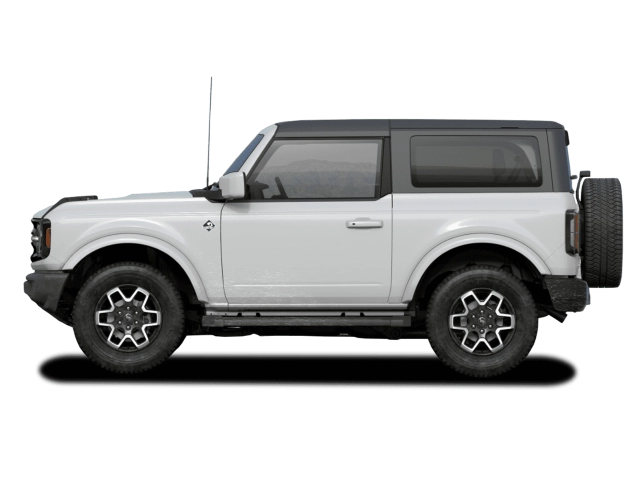
2027 Ford Bronco Owner's Manual
2027 Ford Bronco owners manual
Year:
2027
Make:
Ford
Model:
Bronco

Online manual

Size:
11.45 MB

Table of Contents

Table of contents
5
Copyright ©
3
About Us
17
Ford Racing
17
Introduction
18
About This Publication
18
Using This Publication
20
Symbols Glossary
21
Symbols Used On Your Instrument Cluster
21
Data Privacy
24
Data Privacy
24
Service Data
25
Event Data
25
Settings Data
26
Connected Vehicle Data
26
Mobile Device Data
27
Emergency Call System Data
27
Environment
28
Protecting the Environment
28
Visual Search
29
Interior Overview
29
Exterior Overview - Excluding: Raptor
30
Exterior Overview - Raptor
31
Unique Features
32
Unique Features
32
Child Safety
34
Child Safety Precautions
34
Child Restraint Anchor Points
35
Child Restraints
36
Installing Child Restraints
38
Booster Seats
42
Child Safety Locks
44
Seatbelts
46
Seatbelt Precautions
46
Fastening and Unfastening the Seatbelts
47
Sensitive Locking Mode
48
Automatic Locking Mode
48
Adjusting the Seatbelts During Pregnancy
49
Seatbelt Reminder
49
Checking the Seatbelts
51
Seatbelt Extensions
51
Personal Safety System™
53
Personal Safety System™
53
Airbags
54
How Do the Front Airbags Work
54
How Do the Side Airbags Work
54
How Does the Safety Canopy™ Work
55
Airbag Precautions
56
Properly Adjusting the Driver and Front Passenger Seats
57
Children and Airbags
57
Front Passenger Sensing System
58
Crash Sensors and Airbag Indicator
61
Disposing of Airbags
62
911 Assist
63
911 Assist
63
Keys and Remote Controls
65
Remote Control Limitations
65
Using the Remote Control
65
Removing the Key Blade
66
Sounding the Panic Alarm
66
Locating Your Vehicle
66
Changing the Remote Control Battery
66
Replacing a Lost Key or Remote Control
67
Programming the Remote Control
68
Keys and Remote Controls Audible Warnings
68
Using the Valet Mode
69
Keys and Remote Controls – Troubleshooting
69
Doors and Locks
70
Operating the Doors From Outside Your Vehicle
70
Operating the Doors From Inside Your Vehicle
70
Autounlock
70
Autolock
70
Mislock
71
Doors and Locks – Troubleshooting
71
Keyless Entry
74
What Is Keyless Entry
74
Keyless Entry Limitations
74
Keyless Entry Settings
74
Using Keyless Entry
74
Keyless Entry – Troubleshooting
75
Tailgate
76
Tailgate Precautions
76
Opening the Tailgate
76
Closing the Tailgate
76
Locking and Unlocking the Tailgate
76
Slide Out Tailgate
78
Tailgate – Troubleshooting
78
Security
80
Passive Anti-Theft System
80
Anti-Theft Alarm System
80
Security – Troubleshooting
81
Power Running Boards
82
Power Running Board Precautions
82
Power Running Board Settings
82
Power Running Boards – Troubleshooting
83
Steering Wheel
84
Adjusting the Steering Wheel
84
Horn
84
Switching the Heated Steering Wheel On and Off - Vehicles With: Heated Steering Wheel
84
Wipers and Washers
85
Wipers
85
Switching the Rear Window Wiper On and Off
85
Reverse Wipe
86
Checking the Wiper Blades
86
Replacing the Front Wiper Blades
86
Replacing the Rear Wiper Blades
87
Washers
88
Wipers and Washers – Troubleshooting
90
Exterior Lighting
91
Exterior Lighting Control
91
Headlamps
91
Autolamps
92
Exterior Lamps
92
Exterior Zone Lighting
94
Automatic High Beam Control
95
Exterior Lighting – Frequently Asked Questions
98
Interior Lighting
99
Switching All of the Interior Lamps On and Off
99
Switching the Front Interior Lamps On and Off
99
Switching the Rear Interior Lamps On and Off
99
Interior Lamp Function
99
Adjusting the Instrument Panel Lighting Brightness
100
Ambient Lighting
100
Interior Lighting – Troubleshooting
100
Windows
101
Opening and Closing the Windows
101
Global Opening
103
Window Bounce-Back
103
Locking the Rear Window Controls
103
Using Short Drop Windows
104
Interior Mirror
105
Interior Mirror Precautions
105
Manually Dimming the Interior Mirror
105
Auto-Dimming Interior Mirror
105
Digital Interior Mirror - Vehicles With: Digital Interior Mirror
105
Exterior Mirrors
107
Adjusting the Exterior Mirrors
107
Folding the Exterior Mirrors
107
Instrument Cluster
108
Instrument Cluster Overview - Excluding: Raptor
108
Instrument Cluster Overview - Raptor
109
Tachometer
109
Speedometer
109
Fuel Gauge
109
Engine Coolant Temperature Gauge
110
Transmission Fluid Temperature Gauge - Automatic Transmission
110
Boost Gauge
110
12V Battery Gauge
110
Instrument Cluster Display
111
Using the Instrument Cluster Display Controls
111
Instrument Cluster Display Main Menu - Excluding: Raptor
111
Instrument Cluster Display Main Menu - Raptor
112
Customizing the Instrument Cluster Display
112
Trip Computer
113
Accessing the Trip Computer
113
Resetting the Trip Computer
113
Remote Start
114
Using Remote Start
114
Remote Start Settings
114
Climate Control
116
Identifying the Climate Control Unit
116
Switching Climate Control On and Off
116
Switching Recirculated Air On and Off
116
Switching Air Conditioning On and Off
116
Switching Maximum Defrost On and Off
116
Switching Maximum Cooling On and Off
116
Switching the Heated Rear Window On and Off
117
Setting the Blower Motor Speed
117
Switching the Heated Mirrors On and Off
117
Setting the Temperature
117
Directing the Flow of Air
118
Auto Mode
118
Climate Control Hints
119
Air Conditioning System Refrigerant
120
Climate Control
121
Identifying the Climate Control Unit
121
Switching Climate Control On and Off
121
Switching Recirculated Air On and Off
121
Switching Air Conditioning On and Off
121
Switching Maximum Defrost On and Off
121
Switching Maximum Cooling On and Off
121
Switching the Heated Rear Window On and Off
122
Setting the Blower Motor Speed
122
Switching the Heated Mirrors On and Off
122
Setting the Temperature
122
Directing the Flow of Air
123
Climate Control Hints
123
Interior Air Quality
125
What Is the Cabin Air Filter
125
Replacing the Cabin Air Filter
125
Front Seats
126
Front Seat Precautions
126
Sitting in the Correct Position
126
Manual Seats
127
Power Seats
129
Seat Features
132
Rear Seats
135
Manual Seats
135
Seat Features
137
Rear Occupant Alert System
139
What is the Rear Occupant Alert System
139
How Does the Rear Occupant Alert System Work
139
Rear Occupant Alert System Precautions
139
Rear Occupant Alert System Limitations
139
Rear Occupant Alert System Settings
140
Rear Occupant Alert System Indicators
140
Rear Occupant Alert System Audible Warnings
140
Rear Occupant Alert System
141
What is the Rear Occupant Alert System
141
How Does the Rear Occupant Alert System Work
141
Rear Occupant Alert System Precautions
141
Rear Occupant Alert System Limitations
141
Rear Occupant Alert System Settings
142
Rear Occupant Alert System Indicators
142
Rear Occupant Alert System Audible Warnings
142
Rear Occupant Alert System
143
What is the Rear Occupant Alert System
143
How Does the Rear Occupant Alert System Work
143
Rear Occupant Alert System Precautions
143
Rear Occupant Alert System Limitations
143
Switching Rear Occupant Alert System On and Off
143
Rear Occupant Alert System Indicators
144
Rear Occupant Alert System Audible Warnings
144
Power Outlets and Device Charging
145
Power Outlets and Device Charging Overview
145
Power Outlet Precautions
146
DC Power Outlet - Vehicles With: 12V Power Outlet
146
AC Power Outlet - Vehicles With: 110-120V 400W Power Outlet
146
USB Ports
147
Storage
149
Glove Compartment
149
Center Console
149
Under Floor Storage
150
Map Pocket
150
Starting and Stopping the Engine
151
Starting and Stopping the Engine – Precautions
151
Push Button Ignition Switch
151
Starting the Engine
152
Engine Block Heater
152
Stopping the Engine
154
Automatic Engine Stop
154
Accessing the Passive Key Backup Position
155
Starting and Stopping the Engine – Troubleshooting
156
Start in Gear
159
What Is Start in Gear
159
Start in Gear Precautions
159
Start in Gear Limitations
159
Using Start in Gear
159
Start in Gear – Troubleshooting
160
Auto-Start-Stop
161
What Is Auto-Start-Stop
161
Auto-Start-Stop Precautions - Manual Transmission
161
Auto-Start-Stop Precautions - Automatic Transmission
161
Switching Auto-Start-Stop On and Off
161
Stopping the Engine - Manual Transmission
162
Stopping the Engine - Automatic Transmission
162
Restarting the Engine - Manual Transmission
162
Restarting the Engine - Automatic Transmission
163
Auto-Start-Stop Indicators
163
Auto-Start-Stop – Troubleshooting
163
Fuel and Refueling
166
Fuel and Refueling Precautions
166
Fuel Quality
166
Locating the Fuel Filler Funnel
167
Running Out of Fuel
167
Refueling
169
Fuel Tank Capacity
170
Fuel and Refueling – Troubleshooting
171
Catalytic Converter
172
What Is the Catalytic Converter
172
Catalytic Converter Precautions
172
Catalytic Converter – Troubleshooting
173
Manual Transmission
174
Manual Transmission Precautions
174
Shifting Into Reverse
174
Crawler Gear
174
Recommended Shift Speeds
175
Checking the Manual Transmission Fluid Level
176
Checking the Clutch Fluid Level
176
Manual Transmission Fluid Capacity and Specification
176
Clutch Fluid Capacity and Specification
177
Manual Transmission – Troubleshooting
178
Automatic Transmission
179
Automatic Transmission Positions
179
Manually Shifting Gears - Excluding: Raptor
181
Manually Shifting Gears - Raptor
182
Shifting Your Immobile Vehicle Out of Park (P)
182
Automatic Transmission Audible Warnings
183
Using Progressive Range Selection - Excluding: Raptor
183
Automatic Transmission Fluid Capacity and Specification
184
Four-Wheel Drive
185
How Does Four-Wheel Drive Work - 4x4 with Part Time Engagement
185
How Does Four-Wheel Drive Work - Advanced 4x4 with 4A Mode
185
Four-Wheel Drive Precautions and Limitations
185
Switching Four-Wheel Drive On and Off
187
Selecting a Four-Wheel Drive Mode - 4x4 with Part Time Engagement
187
Selecting a Four-Wheel Drive Mode - Advanced 4x4 with 4A Mode
188
Four-Wheel Drive Modes
189
Four-Wheel Drive Indicators
190
Transfer Case Fluid Capacity and Specification
190
Four-Wheel Drive – Troubleshooting
191
Front Axle
193
Front Axle Fluid Capacity and Specification - Excluding: Raptor
193
Front Axle Fluid Capacity and Specification - Raptor
193
Rear Axle
195
Rear Axle Fluid Capacity and Specification
195
Electronic Locking Differential
196
What Is the Electronic Locking Differential
196
Switching the Electronic Locking Differential On and Off - Excluding: Raptor
196
Switching the Electronic Locking Differential On and Off - Raptor
198
Electronic Locking Differential Indicators
199
Electronic Locking Differential – Troubleshooting
200
G.O.A.T. Mode Control
202
What Is G.O.A.T. Mode Control
202
How Does G.O.A.T. Mode Control Work
202
Selecting a G.O.A.T. Mode - Excluding: Raptor
202
Selecting a G.O.A.T. Mode - Raptor
203
G.O.A.T. Modes
205
G.O.A.T. Mode Control – Troubleshooting
211
Brakes
213
Brake Precautions
213
Brake Over Accelerator
213
Locating the Brake Fluid Reservoir - 2.3L EcoBoost™
213
Locating the Brake Fluid Reservoir - 3.0L EcoBoost™
213
Checking the Brake Fluid
213
Brake Fluid Specification
214
Brakes – Troubleshooting
215
Electric Parking Brake
216
What Is the Electric Parking Brake
216
Applying the Electric Parking Brake
216
Applying the Electric Parking Brake in an Emergency
216
Manually Releasing the Electric Parking Brake
216
Automatically Releasing the Electric Parking Brake
216
Electric Parking Brake Audible Warning
217
Releasing the Electric Parking Brake if the Vehicle Battery Has Run Out of Charge
217
Electric Parking Brake – Troubleshooting
217
Hill Start Assist
219
What Is Hill Start Assist
219
How Does Hill Start Assist Work
219
Hill Start Assist Precautions
219
Switching Hill Start Assist On and Off - Manual Transmission
219
Switching Hill Start Assist On and Off - Automatic Transmission
219
Hill Start Assist – Troubleshooting
219
Traction Control
220
What Is Traction Control
220
How Does Traction Control Work
220
Switching Traction Control On and Off
220
Traction Control Indicator
220
Traction Control – Troubleshooting
221
Stability Control
222
How Does Stability Control Work
222
Switching Stability Control On and Off
223
Stability Control Indicator
224
Trail Control
225
What Is Trail Control
225
Trail Control Limitations
225
Switching Trail Control On and Off
225
Setting the Trail Control Speed
225
Canceling the Set Speed
226
Trail Control Indicators
226
Trail One Pedal Drive
226
Trail One Pedal Drive – Troubleshooting
228
Trail Control – Troubleshooting
229
Trail Turn Assist
230
What Is Trail Turn Assist
230
Trail Turn Assist Precautions and Limitations
230
Switching Trail Turn Assist On and Off
230
Trail Turn Assist Indicators
230
Trail Turn Assist – Troubleshooting
231
Stabilizer Bar Disconnect
232
What Is the Stabilizer Bar Disconnect
232
Stabilizer Bar Disconnect Precautions
232
Switching the Stabilizer Bar Disconnect On and Off - Excluding: Raptor
232
Switching the Stabilizer Bar Disconnect On and Off - Raptor
233
Stabilizer Bar Disconnect Indicators
234
Stabilizer Bar Disconnect – Troubleshooting
235
Hill Descent Control
237
What Is Hill Descent Control
237
How Does Hill Descent Control Work
237
Hill Descent Control Precautions
237
Switching Hill Descent Control On and Off
237
Setting the Hill Descent Speed
237
Hill Descent Control Indicator
237
Hill Descent Control – Troubleshooting
238
Steering
239
Electric Power Steering
239
Steering – Troubleshooting
240
Driver Assistance Systems
241
Driver Assistance Systems Overview
241
Pre-Collision Assist
246
Rear View Camera
249
360 Degree Camera
251
Parking Aids
255
Cross Traffic Alert
259
Blind Spot Information System
262
Driver Alert
265
Lane Keeping System
266
Cruise Control
271
Adaptive Cruise Control
273
Load Carrying
280
Load Carrying Precautions
280
Locating the Safety Compliance Certification Labels
281
What Is the Gross Axle Weight Rating
281
What Is the Gross Vehicle Weight Rating
281
What Is the Gross Combined Weight Rating
282
Calculating Payload
282
Calculating the Load Limit
283
Roof Rack
284
Fender Anchor Points
287
Rear Cargo Area
288
Rear Cargo Area Anchor Points
288
Connecting a Trailer
289
Connecting a Trailer Precautions
289
Connecting a Trailer
289
Connecting a Trailer – Troubleshooting
291
Towing a Trailer
292
Towing a Trailer Precautions
292
Trailer Brake Precautions
292
Towing a Trailer Limitations
293
Loading Your Trailer
293
Trailer Towing Hints - Manual Transmission
293
Trailer Towing Hints - Automatic Transmission
294
Launching or Retrieving a Boat or Personal Watercraft
295
Towing Weights and Dimensions
295
Towing a Trailer – Troubleshooting
297
Trailer Sway Control
298
How Does Trailer Sway Control Work
298
Trailer Sway Control Precautions
298
Switching Trailer Sway Control On and Off
298
Off-Road Driving
299
Basic Off-Road Driving Techniques
299
Driving Your Vehicle at High Speeds
302
Off-Road Driving Aids
302
After Driving Your Vehicle Off-Road
304
Driving Hints
306
Breaking-In
306
Driving Economically
306
Driving in Cold Weather
306
Driving Through Water
307
Driving In Sand
309
Floor Mats
309
Crash and Breakdown Information
310
Roadside Assistance
310
Switching the Hazard Flashers On and Off
311
Jump Starting the Vehicle
311
Post-Crash Alert System
314
Post-Collision Braking
314
Automatic Crash Shutoff
314
Recovery Towing
315
Transporting the Vehicle
318
Fail-Safe Cooling
318
Towing Your Vehicle
320
Towing Your Vehicle Precautions
320
Recreationally Towing Your Vehicle - Manual Transmission
320
Recreationally Towing Your Vehicle - Automatic Transmission
322
Emergency Towing - Manual Transmission
325
Emergency Towing - Automatic Transmission
325
Towing Your Vehicle – Troubleshooting
326
Fuses
327
Fuse Precautions
327
Under Hood Fuse Box
327
Body Control Module Fuse Box
331
Identifying Fuse Types
334
Fuses – Troubleshooting
334
Maintenance
335
Maintenance Precautions
335
Opening and Closing the Hood - Excluding: Raptor
335
Opening and Closing the Hood - Raptor
336
Under Hood Overview - 2.3L EcoBoost™
337
Under Hood Overview - 3.0L EcoBoost™
338
Engine Oil
339
Engine Air Filter
344
Coolant
346
Drive Belt Routing Overview - 2.3L
350
Drive Belt Routing Overview - 3.0L EcoBoost™
350
12V Battery
351
12V Battery – Troubleshooting
353
Adjusting the Headlamps
355
Exterior Bulbs
356
Interior Bulbs
358
Vehicle Specifications
359
Engine Specifications - 2.3L
359
Engine Specifications - 3.0L
360
Motorcraft Parts - 2.3L
361
Motorcraft Parts - 3.0L
362
Removable Vehicle Components
363
Removable Windows
363
Removable Doors
367
Removable Roof Panels
375
Removable Fenders
386
Removable Hard Top - Excluding: Raptor
387
Removable Hard Top - Raptor
388
Removable Soft Top
388
Removable Running Boards
392
Removable Front Bumper End Caps - Raptor
394
Storing the Doors - Excluding: Raptor
401
Storing the Doors - Raptor
405
Vehicle Care
409
Cleaning Products
409
Cleaning the Exterior
410
Cleaning the Interior
413
Repairing Minor Paint Damage
415
Waxing Your Vehicle
415
Storing Your Vehicle
416
Preparing Your Vehicle for Storage
416
Removing Your Vehicle From Storage
417
Wheel and Tire Information
418
Locating the Tire label
418
Department of Transportation Uniform Tire Quality Grades
418
Information on the Tire Sidewall
419
Glossary of Tire Terminology
424
Tire Replacement Requirements
425
Using Snow Chains
427
Tire Care
429
Checking the Tire Pressures
429
Inflating the Tires
429
Inspecting the Tire for Wear
430
Inspecting the Tire for Damage
431
Inspecting the Wheel Valve Stems
435
Tire Rotation
435
Tire Pressure Monitoring System
437
What Is the Tire Pressure Monitoring System
437
Tire Pressure Monitoring System Overview
437
Tire Pressure Monitoring System Precautions
438
Tire Pressure Monitoring System Limitations
438
Viewing the Tire Pressures
439
Tire Pressure Monitoring System – Troubleshooting
439
Changing a Road Wheel
441
Changing a Flat Tire - Excluding: Raptor
441
Changing a Flat Tire - Raptor
445
Wheel Nuts - Excluding: Raptor
450
Wheel Nuts - Raptor
451
Vehicle Identification
452
Vehicle Identification Number
452
Connected Vehicle
453
What Is a Connected Vehicle
453
Connected Vehicle Requirements
453
Connected Vehicle Limitations
453
Connecting the Vehicle to a Mobile Network
453
Connecting the Vehicle to a Wi-Fi Network
453
Connected Vehicle Settings
454
Connected Vehicle – Troubleshooting
454
Vehicle Hotspot
456
Vehicle Hotspot
456
Audio System
457
Audio System Precautions
457
Identifying the Audio Unit
457
Switching the Audio Unit On and Off
457
Selecting the Audio Source
457
Media Control Buttons
457
Adjusting the Volume
458
Setting a Memory Preset
458
Muting the Audio
458
Adjusting the Sound Settings
458
Setting the Clock and Date
458
AM/FM Radio
459
Switching the Display On and Off
459
Digital Radio
459
Satellite Radio
461
Audio System – Troubleshooting
463
Center Display
467
Center Display Overview
467
Status Bar
468
Information On Demand Screen
469
Feature Bar
469
Settings
470
Driver Assistance Menu
470
Rebooting the Center Display
470
Voice Interaction
471
Ford Assistant
471
Alexa Built-In
473
What is Alexa Built-In
473
Alexa Built-In Requirements
473
Signing In to Your Account
473
Using Alexa Built-In
473
Alexa Built-In Settings
473
Phone
475
Phone Precautions
475
Connecting Your Phone
475
Phone Menu
475
Making and Receiving a Phone Call
477
Sending and Receiving a Text Message
478
Switching Text Message Notification On and Off
479
Enabling Apps on a Mobile Device
479
Switching Apple CarPlay On and Off
479
Switching Android Auto™ On and Off
481
Bluetooth®
483
Connecting a Bluetooth® Device
483
Playing Media Using Bluetooth®
483
Navigation
484
Connected Navigation
484
Accessing Navigation
484
Navigation Map Updates
484
Adjusting the Map
484
Live Traffic
484
Setting a Destination
485
Waypoints
485
Route Guidance
486
Vehicle Software Updates
487
Vehicle Software Updates
487
Software Update Settings
487
Software Update Indicators
488
Vehicle System Reset
489
Performing a System Reset
489
Accessories
490
Accessories
490
Auxiliary Switches
492
What Are the Auxiliary Switches
492
Locating the Auxiliary Switches
492
Ford Protect
493
What Is Ford Protect
493
Scheduled Maintenance
495
General Maintenance Information
495
Scheduled Maintenance
498
Customer Information
502
Rollover Warning
502
Getting the Services You Need
502
In California (U.S. Only)
504
The Better Business Bureau Auto Line Program
506
The Mediation and Arbitration Program
506
Getting Assistance Outside the U.S. and Canada
507
Reporting Safety Defects in the United States
508
Reporting Safety Defects in Canada
508
Third Party Software Copyright Acknowledgment
509
Radio Frequency Certification Labels
509
Perchlorate
509
Replacement Parts Recommendation
509
Mobile Communications Equipment
510
Federal Highway Administration Regulation
510
End User License Agreement
511
Emission Law
536
Export Unique Options
537
Warranty Information
538
Appendices
540
Electromagnetic Compatibility
540
Index
545

2027 Ford Bronco Overview

Owner's Manual

The Owner’s Manual for the 2027 Ford Bronco is your guide to getting the most from the vehicle safely and confidently. It explains how to operate key systems, understand dashboard indicators, use off-road technology, and follow recommended maintenance intervals. Whether you are learning the Bronco’s drive modes, adjusting the removable roof and doors, or checking towing and cargo limits, the manual helps you make informed decisions. It also outlines safety precautions, warranty details, fluid specifications, and procedures for everyday care, making it an essential reference for both new and experienced owners. By consulting it regularly, you can better preserve performance, improve reliability, and enjoy the Bronco’s capabilities with greater confidence.

Introduction

The 2027 Ford Bronco continues its reputation as a rugged, adventure-ready SUV designed for drivers who want capability on pavement and confidence off the beaten path. Built with unmistakable styling, high ground clearance, and a purpose-driven chassis, it blends classic Bronco character with modern technology. Its removable tops, available four-door practicality, and strong trail-focused engineering make it equally appealing for weekend explorers and daily commuters. For 2027, the Bronco emphasizes versatility, offering a mix of comfort, connectivity, and durable hardware that supports outdoor lifestyles without sacrificing refinement.

Powertrains

Ford equips the 2027 Bronco with a range of powertrains aimed at balancing performance and efficiency. Turbocharged EcoBoost engines are expected to remain central to the lineup, providing responsive torque for climbing, passing, and low-speed trail work. Depending on configuration, drivers may choose engines tuned for stronger highway performance or greater off-road control. Paired with advanced automatic or manual transmissions on select models, the Bronco’s powertrains are engineered to deliver confident power delivery, solid towing ability, and the kind of low-end muscle that matters most when terrain gets challenging.

Trims

The 2027 Bronco lineup is expected to offer trims that range from well-equipped entry models to highly specialized off-road variants. Base versions focus on essential capability and everyday usability, while mid-level trims add upgraded materials, convenience features, and enhanced trail equipment. Performance-oriented models such as the Badlands or Raptor-style variants emphasize serious suspension, locking differentials, and greater terrain mastery. This trim strategy allows buyers to select a Bronco that matches their needs, whether they want a stylish adventure SUV, a family-friendly utility vehicle, or a purpose-built rock crawler.

Features

Inside and out, the 2027 Ford Bronco is built around flexibility and control. Available features may include advanced four-wheel-drive systems, terrain management modes, trail cameras, heavy-duty skid protection, and water-resistant interior materials. Technology offerings can extend to a digital instrument cluster, large touchscreen infotainment, smartphone integration, and driver-assist systems that support confidence on long trips and in tight environments. The Bronco also stands out for practical touches like easy-clean surfaces, removable panels, and accessory-ready mounting points, reinforcing its identity as an SUV designed for exploration without compromise.

User manual download

The Ford Bronco owner manual for the 2027 model year is to be found in PDF downloadable format on this page. The owner manual for the model year 2027 is free and in English, but the repair manuals are usually not easy to get and may cost more.

Posted by, John Mana author bio image
A passionate guy about car models, makes, and manuals.

Manual Questions

Do you have questions about the 2027 Ford Bronco owners manual?
Fill the form below and someone will help you!